
Free Bypass AI
Enter or paste your text and click Humanize.
Trusted by 1M+ users worldwide






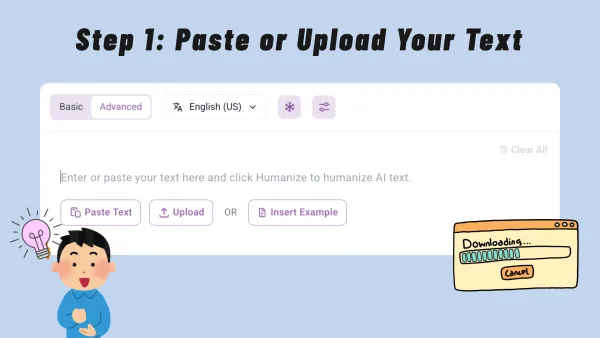
Step 1: Paste or Upload Your Text
Paste your AI-generated text into the editor, or upload a document. Check that the content is complete and readable, especially for essays, articles, reports, emails, or longer drafts. Bypass AI works better with full context.
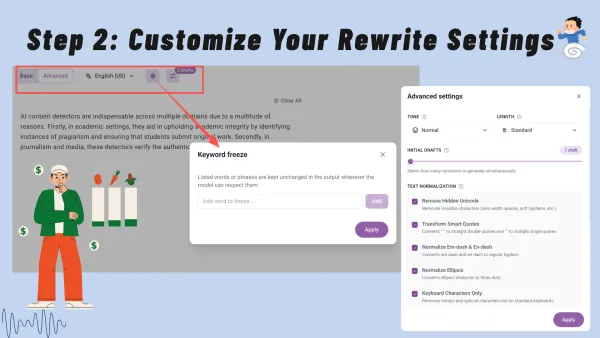
Step 2: Customize Your Rewrite Settings
Choose Basic or Advanced mode and select the output language. If needed, freeze keywords, names, SEO terms, or phrases that should stay unchanged. You can also adjust tone, length, draft quantity, and cleanup options for cleaner results.
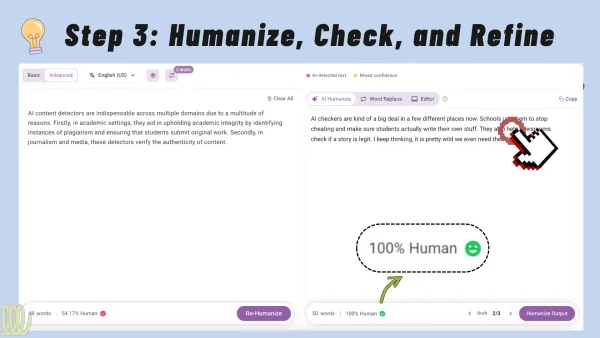
Step 3: Humanize, Check, and Refine
Click Humanize to generate rewritten results. Review the drafts, compare AI scores before and after, and choose the most natural version. You can still edit the output, rewrite AI-like sentences, replace words, or run another pass.
Why Choose Our Bypass AI?
Bypass AI helps turn AI-written drafts into natural, accurate content you can review with clear before-and-after AI scores.
Make AI Writing More Human
AI drafts may look correct but still feel flat, predictable, or overly polished. Bypass AI reshapes them with better rhythm, sentence variety, and readability. Instead of only swapping words, it focuses on how the text feels to real readers, making it stronger for blogs, essays, emails, product pages, social posts, and other content where tone and trust matter.
Lower AI Detection Risk
Users often cannot tell if a rewrite performs better until they test it elsewhere. Bypass AI shows AI scores before and after rewriting, making the result easier to judge. This helps users see what is improving and where more edits may be needed.
Protect Meaning and Key Terms
Many users need to keep exact wording for SEO, brand consistency, citations, product names, or technical accuracy. Bypass AI improves naturalness while protecting key terms and original meaning, avoiding fluent rewrites that accidentally change the message.
Save Time on Rewriting
Manual editing takes time, especially when users need to rewrite, test, revise, and test again. Bypass AI combines humanization and AI score review in one workflow, helping users generate, compare, edit, and refine drafts without switching between tools.
Core Features of Bypass AI
Improve My AI Text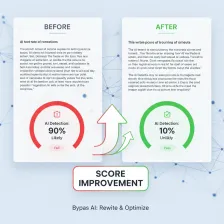
Before-and-After AI Rate Checking
Bypass AI does more than rewrite text. It shows AI rates before and after humanization, helping users judge whether the new version performs better. Instead of relying only on how the text sounds, users can compare score changes and decide whether to rewrite again, make small edits, or run a deeper pass.
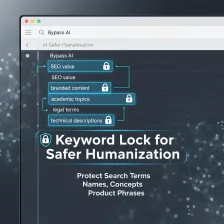
Keyword Lock for Safer Humanization
Important words should not disappear during rewriting. Bypass AI supports keyword locking, so users can protect search terms, names, concepts, product phrases, or wording that must stay unchanged. This gives more control over the final output and helps preserve SEO value, accuracy, and brand consistency.
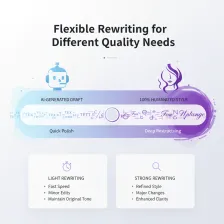
Flexible Rewriting for Different Quality Needs
Not every draft needs the same level of rewriting. Some text only needs a quick polish, while other content needs deeper restructuring. Bypass AI supports lighter and stronger rewriting paths, helping users balance speed, control, and output quality.
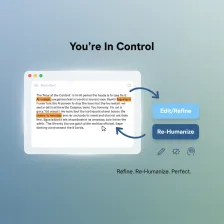
Editable Results and Re-Humanize Options
After the first rewrite, users can keep improving the result instead of accepting it as final. Bypass AI supports manual editing and re-humanization, so users can adjust wording, refine tone, or run another pass when the score is not ideal. This creates a realistic workflow for content that needs review, not just one-click output.
Who Benefits From Bypass AI?
Students and Academic Writers
Students keep using AI for essay outlines or summaries, but the result usually feels stiff and totally repetitive. It kills their real voice. Bypass AI helps turn those drafts into writing that actually sounds natural while keeping their own arguments. It is honestly pretty useful for things like research summaries or application drafts where what you are saying matters just as much as how it flows. Plus, you can check AI scores before and after you rewrite your work. That gives you a practical way to tell if your stuff is finally ready to hand in or if it needs another look.
Improve My AI Text
SEO Writers and Content Marketers
For SEO teams, AI drafts can save time, but poor rewriting can damage keyword consistency, brand voice, or reader trust. Bypass AI supports a more controlled workflow by helping writers humanize AI-generated blog posts, landing pages, product descriptions, and newsletters without losing important search phrases. Writers can protect key terms, improve sentence flow, and compare AI rates after rewriting. This makes the workflow valuable when the goal is not only to reduce AI-like patterns, but also to keep the content useful, readable, and aligned with search intent.
Improve My AI Text
Business Professionals and Teams
Business users count on AI for emails, reports, and client updates, but the results usually sound stiff. It is kind of robotic. Nobody wants to send a proposal that reeks of a generator. Bypass AI actually fixes that by nudging your draft to sound like a real person wrote it. You keep your facts and names, but the tone gets way more natural. You can check the authenticity score too. It is a quick way to make sure your messages do not sound fake.
Improve My AI Text
Creators, Freelancers, and Personal Brands
When you publish often, your writing needs to sound like it came from you, not from the same AI template everyone else is using. Bypass AI helps clean up captions, portfolio copy, scripts, newsletters, and social posts that start as AI drafts, making them feel more natural and easier to read. You can keep the main idea, hold onto important phrases, and make small edits until the final version matches your own voice. It is a practical option for creators and freelancers who want to move from rough AI text to polished content without rewriting everything from scratch.
Improve My AI Text
What Users Say About Bypass AI
Real users share how Bypass AI improves AI-written drafts, preserves important wording, and makes results easier to verify.



FAQ About Bypass AI
Find answers about how Bypass AI works, what it can rewrite, and how AI score checks fit into the workflow.
Is Bypass AI free to use?
Dechecker uses a freemium model. Guest users can use the tool up to 5 times per day. After signing in, users receive monthly credits that can be used across supported Dechecker tools. When the free daily limit or monthly credits are used up, users need to subscribe to a paid plan to continue using the tool.
What is Bypass AI?
Bypass AI is a tool that helps turn robotic AI text into more natural, human-like writing. It keeps your core meaning clear, protects important wording, and lets you compare AI scores before and after rewriting in one place.
How does Bypass AI work?
Bypass AI looks at your draft's structure, wording, and rhythm, then helps you humanize AI text with more natural phrasing and sentence variety. After the rewrite, you can check the AI rate again to see how the new version compares with the original.
Can Bypass AI keep my keywords unchanged?
Yes. Bypass AI can protect keywords, SEO phrases, brand names, product terms, or other wording you do not want to change. This helps the final text sound more natural without losing the terms that matter for accuracy, branding, or search visibility.
Can I compare AI scores before and after rewriting?
Yes. Bypass AI lets you review AI scores before and after the rewrite, so you can see whether the new version performs better. It gives you a clearer way to judge the result instead of relying only on how the text sounds.
What types of content can I use with Bypass AI?
You can use Bypass AI for essays, blog posts, articles, emails, product descriptions, social media captions, reports, scripts, website copy, and more. It works best when you provide enough context, so the rewrite can keep the logic, tone, and meaning consistent.
Is Bypass AI only for students?
No. Students use Bypass AI for academic drafts, but it also works well for SEO writers, marketers, freelancers, creators, and business teams. Anyone who uses AI-generated text can use it to make writing sound more natural and easier to review.
Will Bypass AI change the meaning of my text?
Bypass AI is designed to keep your main ideas while improving how the text reads. Still, you should review the final version yourself, especially for legal, medical, academic, financial, or technical content where accuracy is important.
Can I edit the result after using Bypass AI?
Yes. After Bypass AI generates a rewritten version, you can edit the text, adjust wording, refine the tone, or run another humanization pass. This gives you more control over the final result instead of forcing you to accept the first output.