
Free image translator
Trusted by 1M+ users worldwide






How to Translate Image Content Online
Step 1: Upload Your Image
Upload the image you want to translate, such as a screenshot, menu, product label, sign, poster, scanned note, app interface, or document photo. DeChecker supports JPG, JPEG, PNG, WEBP, and SVG up to 3MB. The tool detects text on the image and prepares it for translation while keeping the original visual context easy to review, so you can translate image content without manually typing every line.
Step 2: Choose a Language and Start Translation
Select the target language and start the translation. The tool analyzes the image text, layout, and context to generate a readable translated image. Whether you are working with travel signs, study notes, shopping labels, or interface screenshots, DeChecker helps you understand image content in another language more easily.
Step 3: Review and Export
After translation is complete, you can review the translated image directly in the viewer. This makes the translate image workflow useful when you want to keep the visual layout while understanding the content. You can download the translated image for later use or continue with related AI tools to better understand the result.
Benefits of Translate Image Online
Translate image content with visual context, clear preview, and downloadable results that fit real tasks.
Translate With Visual Context
Plain text translation is useful, but it is not always enough. A menu item, app button, warning label, or diagram note can lose meaning when separated from the image. DeChecker helps you translate image text while keeping the visual layout easy to review. This makes the result easier to understand, especially when you are checking names, prices, numbers, instructions, or short UI text.
Skip Manual Typing
Screenshots and photos usually do not let you select text. Retyping them is slow and easy to get wrong, especially with unfamiliar characters. With DeChecker, you can upload the image and let the tool handle recognition and translation. This makes translate image work faster for long screenshots, dense labels, foreign menus, and mixed-language images that would otherwise take too much manual effort.
Preview and Download Results
Some translation tasks need more than plain text. When you translate image content with DeChecker, you can review the translated image directly in the viewer and keep the visual layout easy to follow. This is useful for signs, menus, labels, posters, study notes, app screens, and scanned materials where context matters. Once the result is ready, you can download the translated image for study, travel, work, or daily reference.
Explore With AI Tools
Sometimes translation is only the beginning. A long screenshot, study page, product manual, or visual instruction may still need explanation after translation. DeChecker offers optional AI tools such as Summary, Mind Map, and Chat, so you can quickly understand the translated content, explore its structure, or ask follow-up questions. This turns a translate image task into a more complete reading and understanding workflow.
Core Features of the Image Translator
Use DeChecker to translate image text, preview clear visual results, download translated images, and explore content with AI.
Translate Image Now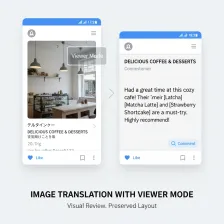
Translate in Viewer Mode
Viewer mode is designed for visual review. It shows the translated image result and supports zooming, dragging, and previewing the output in context. This is useful when you translate image files where layout matters, such as screenshots, posters, signs, product labels, menus, and interface images. Instead of separating the text from the picture, DeChecker keeps the visual format useful during review.
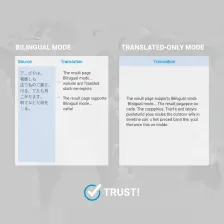
Clear Image-Based Translation
The Image Translator helps turn text inside an image into a readable translated visual result. It works well for common real-world materials such as travel signs, study notes, shopping labels, scanned pages, posters, and app screenshots. When you translate image content, the surrounding layout can help users understand short text, numbers, instructions, and labels more clearly.
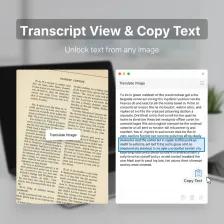
Support for Common Image Formats
DeChecker supports common image formats including JPG, JPEG, PNG, WEBP, and SVG up to 3MB. This makes the image translator useful for different types of files, from phone screenshots and document photos to product labels and online posters. Users can upload an image directly and get a translated result without extra file conversion steps.
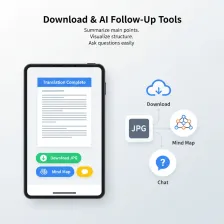
Download and AI Follow-Up Tools
Once translation is complete, you can download the translated image as a JPG. You can also use Summary, Mind Map, or Chat to continue working with the translated content. Summary helps you understand the main points, Mind Map helps you see structure, and Chat lets you ask questions about the image content. This is useful when you need to translate image material and then actually use the information afterward.
Who Benefits From Translate Image?
Translate image text for study, travel, shopping, research, and professional workflows where visual context matters.

Students and Researchers
Students often work with lecture slides, textbook screenshots, scanned notes, academic posters, and research images. When the text is in another language, they need more than a rough translation. They need to understand the content while keeping the original visual context clear. DeChecker helps students translate image materials, review translated results visually, and use AI tools to understand longer or more complex content faster.
Travelers and International Users
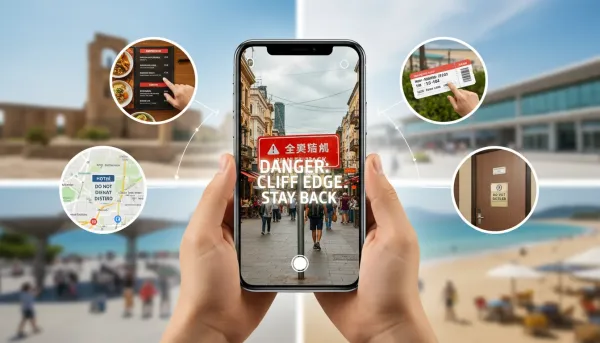
Travelers often need to translate image content from signs, menus, hotel rules, train notices, maps, tickets, and product labels. Guessing from context may work for simple words, but not for warnings, directions, prices, or rules. DeChecker helps users translate image content from photos and screenshots, then download the translated image for easier reference during a trip.

Online Shoppers and Product Users
Many product details are locked inside images, such as size charts, care labels, ingredients, manuals, shipping notes, and seller screenshots. With DeChecker, shoppers can translate image information before buying or using a product. The image translator helps reduce mistakes around sizing, safety warnings, compatibility, and usage instructions, especially in cross-border shopping.

Creators, Marketers, and Professionals
Creators and teams often review visual materials from different markets, including ads, app screenshots, competitor pages, social posts, customer images, and presentation slides. A reliable image translator helps them translate image content while keeping the visual context available. They can review the translated image, understand key information faster, or use Summary and Chat to turn translate image results into usable insights.
What Users Say About Our
Translate Image Tool
Real users use DeChecker to translate image text, check context, and reuse results across daily work.



FAQ About Translate Image
Find answers about image uploads, translated image previews, downloads, supported formats, and AI tools after translation.
What is the Image Translator?
Image Translator is DeChecker's online tool for translating text shown on an image. You can upload a screenshot, photo, scan, menu, label, poster, sign, or other image with readable text. The translated result appears as an image-based preview, so you can review the content visually, download the translated image, or use AI tools for deeper understanding.
What image formats are supported?
DeChecker supports JPG, JPEG, PNG, WEBP, and SVG files under 3MB. You can upload files from your device or drag them into the upload area. Clear images with readable text usually produce better translate image results.
What kinds of images can I translate?
You can translate image content from many everyday and study-related materials, including screenshots, scanned notes, menus, product labels, posters, signs, app interfaces, document photos, and visual instructions. The image translator is useful when the text is part of the image and cannot be selected directly.
Can I preview the translated image?
Yes. After translation, you can review the translated image directly in the viewer. This helps keep the layout and visual context clear, which is useful for menus, signs, labels, posters, study pages, and screenshots where position and surrounding information matter.
Can I download the translated image?
Yes. After DeChecker translates the image, you can download the translated result as a JPG. This is useful when you want to save a translated screenshot, share a product label, keep a study image, or store a visual record of the translate image result.
Does the Image Translator work for screenshots and scanned notes?
Yes. DeChecker can translate image text from screenshots, scanned pages, and photos as long as the text is clear enough to read. For better results, use images with good lighting, sharp text, and minimal blur or distortion.
What AI tools can I use after translation?
After translation, you can use Summary, Mind Map, or Chat to understand the image content more deeply. If the image contains long instructions, study notes, product details, or dense information, DeChecker's Summarizer can help you quickly grasp the main points after you translate image content.
When should I use PDF Translator instead?
Use Image Translator when you want to translate image files such as JPG, PNG, WEBP, SVG, screenshots, or photos. If you need to translate a full PDF document with multiple pages, DeChecker's PDF Translator is a better fit for that workflow.